Cross Reference lets a flow remember a value now and look it up later, on a completely different flow run.
Integrations often need to connect two identifiers that never appear in the same file. Your customer sends a booking using their own reference number. Weeks later they send a status update carrying only that same reference, but your forwarding system needs its shipment ID to apply the update. Cross Reference stores the pairing the first time it sees both values, and hands it back every time afterward.
If both values are already present in the same document, you don't need Cross Reference. Use a field mapping instead.
Two Components
Cross Reference is a pair of components, and you add whichever one the flow needs.
Cross Reference Write saves pairings. Cross Reference Read looks them back up and writes the result onto the document. Most flows use only one of the two. A flow that receives bookings saves; a flow that receives status updates reads.
Each component holds a table of rules, and each rule has three settings: a Namespace, a Key Field, and the field whose value is being stored or retrieved (Field To Save on the write side, Field To Load on the read side). A component needs at least one rule before the flow will save.
The Namespace is a label that groups related pairings together. The namespace you save a value under has to match the namespace you load it back under. The Key Field is the field that identifies the record, the thing you look up by. The third field is the value itself, either the one being stored or the one being written onto the document.
A write rule reads both fields off the document and stores the pairing. A read rule reads the Key Field, finds the matching stored value, and writes it into the field you chose. Everything else in the flow continues normally, because Cross Reference only adds or updates a field. It never filters or stops documents on its own.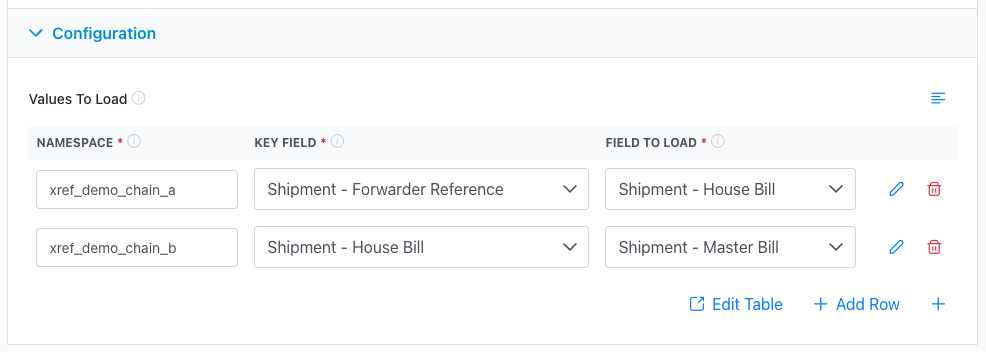
Order Is Where You Put the Steps
Each component is one step on the canvas, and the flow runs its steps in the order you place them. If a flow both saves and reads in the same run, the step you put first is the one that runs first.
That matters when a read depends on something the same run just saved. Put Cross Reference Write ahead of Cross Reference Read and the saved pairing is there when the read goes looking for it. Put them the other way round and the read runs against whatever was stored by earlier runs.
Rules within a single component run top to bottom, in the order they appear in the table. If one rule looks up a value using a field an earlier rule just filled in, put the rules in that order.
An Example
A customer books shipments using their own reference, CUST-10045. Your forwarding system assigns its own ID, S00012345.
On the inbound booking flow, once both values are present, you add a Cross Reference Write step with one rule. Set the Namespace to customer_shipment_ids, the Key Field to Shipment - Shipper Reference, which holds CUST-10045, and the Field To Save to Shipment - Source System ID, which holds S00012345.
On the flow that handles their status updates, where only the customer reference arrives, you add a Cross Reference Read step. Use the same namespace, customer_shipment_ids, the same Key Field, and set the Field To Load to Shipment - Source System ID.
Now every status update arrives carrying the customer's reference and leaves carrying your system's ID.
Namespaces Are Shared Across Your Workspace
Important: A namespace is scoped to your entire workspace, not to a single flow, trading partner, or connection. Two flows using the namespace
order_idsare reading and writing the same set of pairings.
That is usually what you want, because saving in one flow and loading in another is the whole point. But it means a namespace that's too generic can collide. If two different partners both send order numbers that happen to overlap, and both flows use order_ids, they will overwrite each other.
Give your namespaces specific names. acme_order_ids is safer than order_ids. Include the partner or the record type whenever there's any chance of ambiguity.
Saving the same Key Field value twice also overwrites the previous pairing. The most recent save wins.
Linking Values Across Document Types
The Key Field and the stored field don't have to live on the same kind of document. You might key off a value on the shipment but write the result onto each purchase order. Pick the two fields you want and Chain.io works out the document types from them.
When the two sides name different document types, Chain.io follows the links between documents in the payload, such as purchase orders attached to a shipment, and updates the linked documents it finds. A document with no link to the other type is skipped.
This only works for documents that are genuinely related in the payload. It will not match documents that merely happen to arrive in the same file.
Which Fields You Can Choose
Both the Key Field and the saved or loaded field are chosen from a curated list of canonical fields rather than from every field the canonical model defines. The list covers the identifiers and references that are useful to look records up by, across shipments, shipment events, consolidations, container moves, purchase orders and pack items.
If the field you want to key off isn't in the list, open a support ticket and tell us which field it is and what you're matching. The list is maintained deliberately, so adding to it is straightforward.
Checking What Happened
Each Cross Reference component reports in the flow run log, and it names itself so you can tell the two apart when a flow does both. A read announces what it's looking for, along the lines of Running Cross-Reference Read: finding "Shipment - Source System ID" by "Shipment - Shipper Reference", then reports how many lookups succeeded and how many failed. A write announces what it's saving and reports how many values it saved and how many it skipped.
The field names in those lines are the same labels you picked in the configuration panel, so a log line tells you which rule it came from without your having to count rows.
If a read isn't producing what you expect, that log is the fastest way to tell whether the lookup ran and missed, or never ran because the Key Field was empty on the incoming document.
Common Problems
The read never finds anything. Check that the namespace matches exactly between the write and the read. Namespaces are case-sensitive and a typo in either one is invisible. Then confirm the saving flow actually ran, and that both fields had values when it did. A save with an empty field on either side stores nothing.
The read finds nothing and the flow carries on anyway. That is expected. A lookup that finds nothing leaves the field as it was and the run continues normally. If a missing value should stop the flow, add a filter or validation step after the read.
The wrong value comes back. This is usually a namespace collision. Check whether another flow writes to the same namespace with overlapping key values.
Nothing happens on a rule that spans two document types. The documents need to be genuinely linked in the payload. If the shipment and the purchase orders arrived as unrelated documents, there is no link to follow.
A read in the same flow misses a value the write just stored. Check the order of the steps on the canvas. The read only sees pairings that were saved before it ran.
Values save but never load, or the reverse. The two components are independent. A pairing has to be saved by some flow before any flow can load it. There is no way to look up data that was never written.
Was this article helpful?
That’s Great!
Thank you for your feedback
Sorry! We couldn't be helpful
Thank you for your feedback
Feedback sent
We appreciate your effort and will try to fix the article