Overview
Normally CargoWise decides when a shipment is sent to Chain.io: the EDI Client pushes it, and your flow processes it. Sometimes another system needs a shipment's full details right away, without waiting for CargoWise to send it again. Chain.io Checks is one example: it may need more information before it can finish checking a shipment.
The Cargowise EDI Client Retriever Launcher handles that. The other system asks for one or more shipments by shipment number. For each one, Chain.io fetches the shipment from your CargoWise and runs it through the same flow that already handles the shipments CargoWise sends you.
- You don't build a second flow, and there's no second mapping to maintain.
- A fetched shipment is handled exactly like a pushed one: the same mapping and the same destinations.
- Each fetched shipment shows up in the Portal as its own execution, with the usual status, log and files, so you can see what happened without leaving the Portal.
In short:
- Add the retriever to the flow that already receives your CargoWise shipments.
- Give the retriever's URL and credentials to the system that needs the data, for example Chain.io Checks.
- That system asks for shipments by number, and each one arrives through your flow just like a pushed shipment.
Key Terminology
- Push launcher: what brings CargoWise data into your flow today: the "Cargowise EDI Client Launcher" in the Visual Builder, or the "Cargowise Next EDI Client" source in Structured Flows. CargoWise decides when it sends a shipment.
- Retriever launcher: the "Cargowise EDI Client Retriever Launcher". It gives your flow a web address that another system can use to ask for specific shipments, instead of waiting for CargoWise to send them.
- Retrieval request: a message another system sends to that address, listing the shipments it wants by shipment number. Sending a Retrieval Request below shows the exact format, for whoever sets up that system.
- Shipment number: the CargoWise shipment number, for example
S00012345. In a retrieval request it's calledforwarder_reference. - Retrieval step: a step named "Retrieve CargoWise Shipment" that Chain.io adds to the start of your flow for you. When a shipment has been asked for, this step fetches it from CargoWise. Shipments CargoWise pushes go straight past it.
- Host system: your workspace's "Cargowise Next EDI Client" host system, which holds your CargoWise connection details. The retriever uses the same details, so you don't enter them again.
- Execution: one run of your flow. Each retrieved shipment gets its own execution, which you can open in the Portal to see its status, log and files.
Before You Start
You need:
- A Cargowise Next EDI Client host system, set up as described in Setting up a CargoWise eAdaptor Next EDI Client Host System.
- The "Send Messages to CargoWise" side of that host system configured and validated, with Basic or OAuth authentication. Chain.io uses this side to ask CargoWise for shipments. A host system that only has "Send Messages to Chain.io" set up can receive pushes, but it can't retrieve shipments.
- The host system's Enterprise ID and Server ID filled in. CargoWise rejects a retrieval request without them, so a flow with a retriever on a host system that lacks them won't deploy.
- An existing flow that already receives shipments from that host system.
How It Works
- Another system sends a retrieval request to your retriever's web address, naming 1 to 50 shipments.
- Chain.io checks the request's credentials and format, then starts one execution per shipment. Each execution keeps a copy of the full request, so you can always see what was asked for.
- In each execution, the "Retrieve CargoWise Shipment" step fetches that shipment from your CargoWise. Its log names the shipment, for example "Retrieving shipment S00012346 from CargoWise (shipment 2 of 2 in the retrieval request)".
- If CargoWise finds the shipment, it goes through the rest of your flow exactly like a pushed shipment.
- Shipments CargoWise pushes go straight past the retrieval step, so pushing keeps working exactly as before.
Setting It Up in the Visual Builder
- Open the flow that already has your Cargowise EDI Client Launcher.
- On the Flow Start node, click Add Launcher and choose "Cargowise EDI Client Retriever Launcher". It sits beside your push launcher, and both feed the same Flow Start.
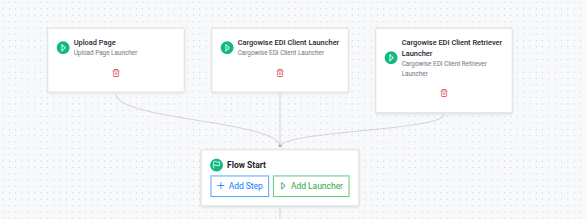
- Select the same Cargowise Next EDI Client host system that your push launcher uses. It must be a host system in your workspace, not a connection (see Limits).
- Choose an Authentication Type: how the other system proves it's allowed to ask. The retriever always needs one, because every request reads from your CargoWise:
- API Key: the other system includes a key you choose, 10 or more characters long, with each request.
- Basic Authentication: the other system sends a username and password with each request.
- OAuth Client: the other system uses one of your workspace's Flow OAuth clients. It first gets an access token from
https://webhooks.chain.io/oauth/tokenwith the client's ID and secret, then includes that token with each request.
- Enter a Sub Path, for example
checks. This finishes the retriever's web address:https://webhooks.chain.io/cargowise-next-retriever/{workspace uuid}/{host system uuid}/{sub path}
The full address appears under the Sub Path field, with a button to copy it. Give this address to the system that will ask for shipments.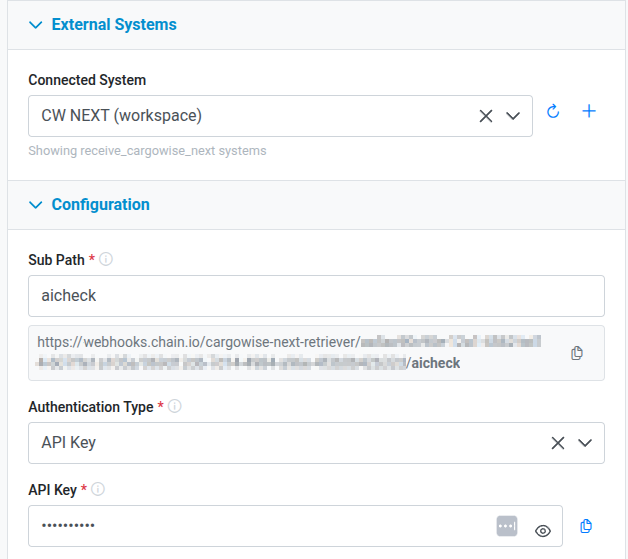
- Deploy the flow. Chain.io adds the "Retrieve CargoWise Shipment" step to the front of the flow for you. Leave every other step as it is.
A flow can have only one retriever launcher.
Setting It Up in Structured Flows
- Open the flow that uses your Cargowise Next EDI Client host system as its Source System, click Settings, and expand the Source System section.
- In the Shipment Retrieval Requests section, turn on "Also accept shipment retrieval requests".
- Enter a Retriever Sub Path, and choose an Authentication Type (API Key, Basic Authentication, or OAuth Client). The options work the same way as in the Visual Builder.
- Copy the retriever's web address shown on the page, give it to the system that will ask for shipments, and save the flow.
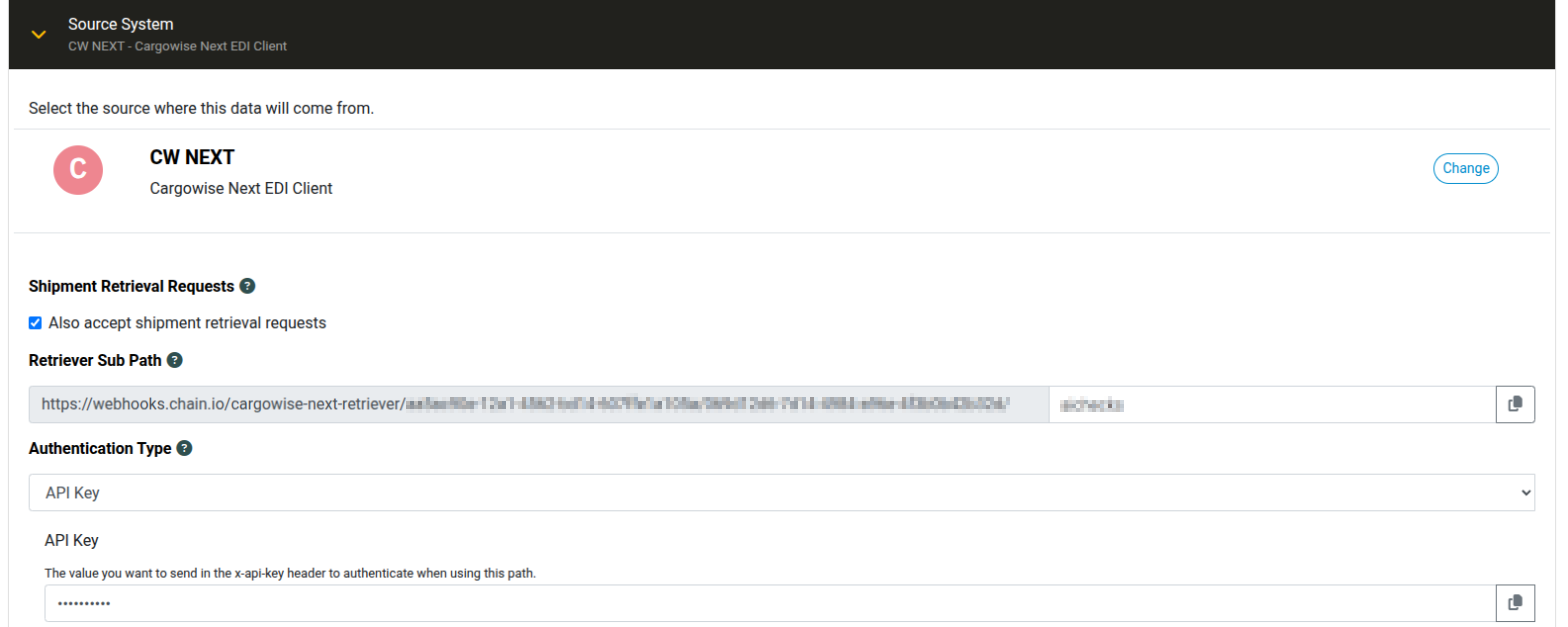
This option appears only when the flow's source is a host system whose "Send Messages to CargoWise" side is set up. It isn't available when the source is a connection.
Sending a Retrieval Request
This section is for whoever sets up the system that asks for shipments. If that's Chain.io Checks, you can skip it: Checks sends the requests for you (see Using It with Chain.io Checks).
Request: POST to your retriever URL with Content-Type: application/json, using the authentication you chose.
{
  "version": "1.119",
  "doc_type": "shipment_json",
  "shipments": [
    { "forwarder_reference": "S00012345" },
    { "forwarder_reference": "S00012346" }
  ]
}doc_typemust be exactlyshipment_json.shipmentsmust hold between 1 and 50 shipments.- Each shipment needs a
forwarder_reference: the CargoWise shipment number to retrieve. You can include other Shipment JSON fields. They're carried into the execution unchanged. - The path must match your retriever URL. A query string on the URL is ignored.
For example, with API Key authentication:
curl -X POST "https://webhooks.chain.io/cargowise-next-retriever/{workspace uuid}/{host system uuid}/checks" \
  -H "Content-Type: application/json" \
  -H "x-api-key: YOUR_API_KEY" \
  -d '{"version": "1.119", "doc_type": "shipment_json", "shipments": [{"forwarder_reference": "S00012345"}]}'
Response: when the request is accepted, you get 200 with an entry for your flow (one per flow, if more than one flow uses the same retriever URL):
[
  {
    "flowUUID": "…",
    "flowName": "CargoWise shipments to Checks",
    "shipments": [
      { "index": 0, "forwarder_reference": "S00012345", "responseUUID": "…", "status": "accepted" },
      { "index": 1, "forwarder_reference": "S00012346", "responseUUID": "…", "status": "accepted" }
    ]
  }
]acceptedmeans the execution was started. It doesn't mean the shipment was found. The retrieval result appears on the execution itself.failed(with amessage) means that one shipment's execution couldn't be started. The other shipments in the request still run.- To match a response to what you asked for, use
forwarder_reference. TheresponseUUIDidentifies the execution when you contact support.
Rejected requests start no executions:
| Problem | Response |
|---|---|
| Body isn't valid JSON, or isn't a JSON object | 400 "request body must be valid JSON" / "request body must be a JSON object" |
doc_type isn't shipment_json | 400 "doc_type must be 'shipment_json'" |
shipments is missing, empty, or not an array | 400 "shipments must be a non-empty array" |
| More than 50 shipments | 400 "at most 50 shipments per request" |
| Wrong or missing credentials | 401 |
| No deployed flow has this URL | 400 "Invalid Flow" |
One Execution per Shipment
Each shipment in a request gets its own execution, and each one succeeds or fails on its own: a shipment that can't be found doesn't affect the others.
- Each execution is labelled with its shipment number, so you can search for it.
- A shipment sent without a shipment number still gets an execution. It fails with "Shipment {n} of the retrieval request has no valid forwarder_reference", so the problem shows up in the Portal.
Finding and Diagnosing Retrievals
Every retrieval carries two data tags, which you can use to search for retrievals:
- Requested Forwarder Reference: the shipment number that was asked for
- Started By:
Shipment Retriever
Pushed shipments don't get these tags.
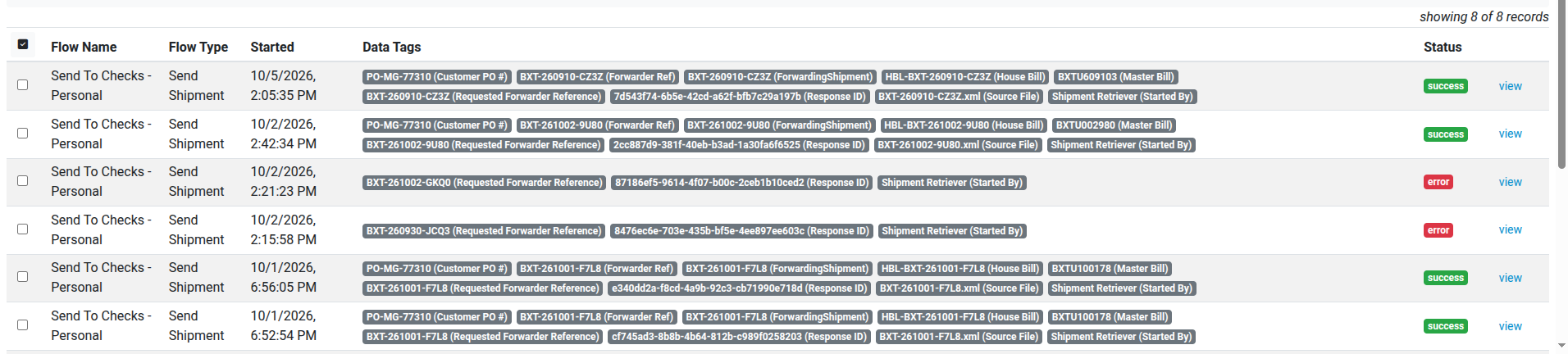
If a retrieval fails, the execution's status is error, and its log shows one of these messages:
| Log message | What it means | What to do |
|---|---|---|
| Shipment {ref} was not found in CargoWise | CargoWise has no forwarding shipment with that number. | Check the shipment number. Trying again won't help. |
| {ref} is a consol, not a shipment (…) | The reference is a consol number. | Request the individual shipment number. Consols can't be retrieved. |
| CargoWise returned a different reference for {ref}: … | CargoWise returned a different shipment from the one asked for. CargoWise's reply is attached. | Check the shipment number and the attached reply. Contact support if it isn't clear. |
| Could not reach CargoWise: … Resubmit to retry. | CargoWise didn't respond, or had a problem on its side, even after automatic retries. | Once CargoWise is reachable, resubmit the execution. |
| CargoWise rejected the credentials for this host | CargoWise didn't accept the host system's "Send Messages to CargoWise" credentials. | Check and revalidate the host system's "Send Messages to CargoWise" settings, then resubmit. |
| CargoWise could not return shipment {ref}: … | CargoWise reported an error. Its reply is attached. | Review the attached reply. Contact support if it isn't clear. |
| CargoWise rejected the request for {ref} (HTTP …): … | CargoWise refused the request for another reason. Any reply is attached. | Review the attached reply. Contact support if it isn't clear. |
| Invalid configuration: missing required property: enterprise_id / server_id | The host system has no Enterprise ID or Server ID, which CargoWise needs. | Fill in the host system's Enterprise ID and Server ID, redeploy the flow, then resubmit. |
| Shipment {n} of the retrieval request has no valid forwarder_reference | The request left out the shipment number, or sent a blank one. | Fix the request in the system that sent it. |
When a retrieval works, the log shows "Retrieving shipment {ref} from CargoWise (shipment {n} of {total} in the retrieval request)" and then "Retrieved {ref} from CargoWise".

When CargoWise pushes a shipment, the step's log shows "Not a retrieval request, passed through".
Limits and Things to Know
- eAdaptor Next host systems only. The retriever works only with a "Cargowise Next EDI Client" host system in your workspace. It doesn't work with connections, which can only receive pushes, or with older eAdaptor (REST or SOAP) host systems.
- "Send Messages to CargoWise", an Enterprise ID and a Server ID must be set up. If the host system's "Send Messages to CargoWise" side isn't set up and validated with Basic or OAuth, or its Enterprise ID or Server ID is missing, the flow won't deploy. The error says what's missing.
- Authentication is required. The retriever has no "No Authentication" option.
- Push launcher filters don't apply. Filters on your push launcher (SenderID, RecipientID, Company, EventType, ActionPurpose, TriggerDescription) don't apply to fetched shipments. Every shipment that's asked for is processed.
- Fetched shipments have no event details. A pushed shipment arrives with details of the CargoWise event that triggered it (EventType, ActionPurpose, TriggerDescription, EventBranch). A fetched shipment doesn't have them, so if your mapping, data tags or filters use those fields, a fetched shipment may be handled differently.
- It returns a shipment. In this version the retriever always fetches a forwarding shipment. Other CargoWise job types, such as customs declarations, will be available in later versions. You can add it to any flow that uses the host system, but it's only useful on flows that handle shipments. On an organization, invoice or booking flow, the rest of the flow won't receive what it expects.
- Shipments only, for now. Consols, orders, and invoices can't be retrieved in this version.
- The data doesn't come back in the reply. The system that asks gets a confirmation that its request was accepted, not the shipment data. The data goes to your flow's destinations, the same as pushed data.
- Unchanged shipments may be skipped. If a shipment hasn't changed since your flow last processed it, your flow may skip it as a duplicate, just as it would a repeated push. In that case nothing new is sent on.
- Load on CargoWise. Every shipment is a live query against your CargoWise. Flow-level throttling applies to retrievals, the same as to pushed messages.
Using It with Chain.io Checks
Checks can call your retriever URL when it needs a shipment's full CargoWise record. A team owner sets it up in Checks under Settings → Connections → CargoWise retrieval:
- Retrieval address: the retriever URL from your flow. It starts with
https://and contains/cargowise-next-retriever/. - Authentication Type and its credentials: the same method and values you chose on the retriever in Chain.io.
- Turn on Ask Chain.io for missing shipment details.
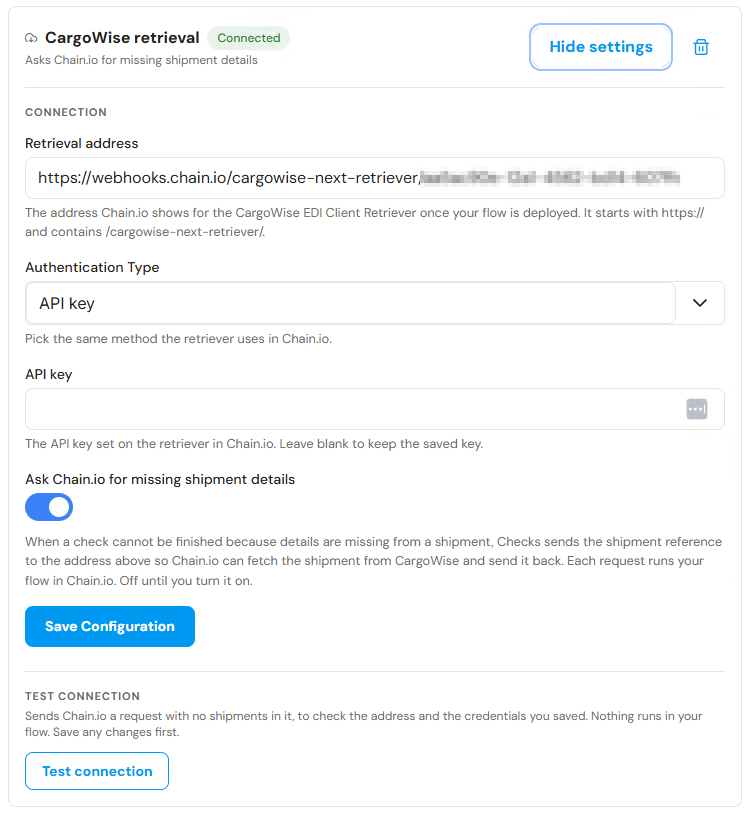
The retrieved shipment then arrives in Checks through your existing flow, the same way as any pushed update.
FAQ
Do I need a new flow? No. Add the retriever to the flow that already processes your pushed CargoWise shipments.
Does this change how pushed messages work? No. Pushed messages pass through the retrieval step unchanged.
Can I use it with something other than Checks? Yes. Any system that can send a request in the format described in Sending a Retrieval Request can use it.
Does retrieval change anything in CargoWise? No. It only reads the shipment.
How do I know whether a retrieval worked? Open the flow's executions and look for the Started By: Shipment Retriever data tag. A successful retrieval has the status success. A failed one has the status error, and its log says why (see Finding and Diagnosing Retrievals).
Where can I see what was asked for? Each execution keeps a copy of the full request in its files. Its log says which shipment that execution fetched.
Where is the Shipment JSON format documented? At docs.chain.io/specs/shipment_json.
Was this article helpful?
That’s Great!
Thank you for your feedback
Sorry! We couldn't be helpful
Thank you for your feedback
Feedback sent
We appreciate your effort and will try to fix the article